Scripts Reference
Full reference for every script under scripts/, grouped by when you'd run it. For the idp CLI (scaffolding services and test suites), see CLI Reference.
Prerequisites
Before running anything in scripts/, install the tools for the path you're taking:
| Path | Required tools | Verify |
|---|---|---|
| Local (Kind) | git, docker, kind ≥ 0.27, kubectl, helm ≥ 3.14 |
kind version && kubectl version --client && helm version && docker info |
| AWS | Everything above, plus aws CLI (configured — aws sts get-caller-identity must succeed), terraform ≥ 1.5, jq |
aws sts get-caller-identity && terraform version && jq --version |
| Optional, auto-installed if missing | go ≥ 1.26 (builds the idp CLI), Node.js 24 LTS (Backstage) |
— |
setup.sh and bootstrap-local.sh/bootstrap.sh each run their own pre-flight check and will tell you exactly what's missing before doing anything destructive — but installing these upfront avoids a mid-run abort. Full local walkthrough: Local Setup. Full AWS walkthrough: AWS Deployment Guide.
setup.sh vs bootstrap-local.sh — why two scripts?
They solve different problems and are not interchangeable:
setup.sh— a one-time personalization pass + dispatcher. It replacesmoatazeldebsy/idp-mvp/ etc. placeholders across the whole repo with your real values, creates.envfiles, builds theidpCLI, then asks local / aws / multi / skip and hands off to the right bootstrap script.bootstrap-local.sh— the actual Kind/Rancher platform installer. It creates the cluster, installs ingress/ArgoCD/observability/OPA, builds and pusheshello-service, and wires up Backstage. It's fully standalone and is what you go back to for day-2 operations (--destroy,--start-backstage,--install-argocd,--print-urls, recreating the cluster).
On a fresh clone you run setup.sh and nothing else — it invokes bootstrap-local.sh for you. Running both back to back is the common mistake: it just repeats a 15–20 minute install. If setup.sh ended with the "Local IDP platform is up" banner and the access URLs, the cluster is already up.
The ordering exists because bootstrapping before personalizing would point ArgoCD's ApplicationSet, catalog entries, and ingress hostnames at unresolved placeholders instead of your org/cluster name — which is why setup.sh owns the dispatch rather than leaving it to you.
Every later invocation (recreate the cluster, add a flag, retry a failed step) goes straight to bootstrap-local.sh (or bootstrap.sh on AWS) without touching setup.sh again.
Quick reference
| Script | What it does |
|---|---|
setup.sh |
Start here (once). Guided interactive setup — replaces placeholders, creates .env files, then bootstraps local or AWS |
bootstrap-local.sh |
Day-2: re-create Kind cluster + platform. Common flags: --start-backstage, --skip-obs, --destroy, --print-urls; full list under bootstrap-local.sh flags |
bootstrap-ai.sh |
Add the AI/ML stack on top of a running cluster. Locally run it directly; on AWS use bootstrap.sh --with-ai (which calls bootstrap-ai.sh --aws), or run bootstrap-ai.sh --aws against an existing cluster. Full flag list below under bootstrap-ai.sh flags; the one worth knowing up front is --agents, which controls how many agent pods you install. |
bootstrap.sh |
AWS single-region bootstrap: Terraform → EKS → core platform (~40–70 min). The AI/ML stack is opt-in with --with-ai (or --adp); full list under bootstrap.sh flags |
verify-secrets.sh |
Pre-flight: checks all required secrets/API keys are set before an AWS deployment. Run before bootstrap.sh |
verify-engineering-intelligence.sh |
Verifies the Engineering Intelligence layer end to end without a Kind cluster — real Backstage image, real Postgres, stubbed Prometheus/OpenCost. --screenshot renders the dashboard, --keep leaves it running |
validate-deployment.sh |
Post-deploy: 50+ automated checks across infra, K8s, Backstage, observability, GitOps, AI, security |
cleanup.sh |
Safe AWS teardown: 9 ordered phases (0–8), removes scaffolded services from ArgoCD + Git before terraform destroy |
recover-docker-restart.sh |
Patch Kind after Docker Desktop restarts — fixes IPs, restarts ingress, smoke-tests all URLs |
Day-0 / Day-1 — Platform setup
| Script | Purpose | Called by |
|---|---|---|
setup.sh |
Entry point. Interactive: replaces placeholders (org, AWS account, region, cluster name), creates .env files, then dispatches to local or AWS bootstrap. |
You (once) |
bootstrap-local.sh |
Creates the Kind cluster, installs nginx ingress, Prometheus/Grafana, ArgoCD, and deploys hello-service. --start-backstage builds + starts Backstage, wires nginx, seeds metrics. --destroy tears everything down: removes scaffolded services from ArgoCD + Helm + git, then deletes the cluster. |
setup.sh → local path, or standalone |
verify-secrets.sh |
Checks GITHUB_TOKEN, AWS credentials, and other required secrets are set and valid before an AWS deployment. Exits non-zero with the missing item if anything is wrong. |
Before bootstrap.sh (manual, or see PRE_DEPLOYMENT_CHECKLIST.md) |
verify-engineering-intelligence.sh |
Boots the real Backstage image against a real Postgres with a stub standing in for Prometheus and OpenCost, then asserts every Engineering Intelligence figure the fixtures imply — scores, evidence sums, withheld dimensions, maturity level, snapshot persistence. ~2 min warm vs ~19 for a cold bootstrap-local.sh. Does not exercise real Prometheus/OpenCost response shapes; only a cluster does that. |
Manual, after changing anything under packages/engineering-intelligence-core/ or engineeringIntelligence/ |
bootstrap.sh |
Provisions AWS EKS, ECR, IAM (Terraform), deploys the core platform components — the AI/ML stack only with --with-ai/--adp (Phase 6 then runs bootstrap-ai.sh --aws internally) — and pushes hello-service to ECR. ~40–70 min. See DEPLOYMENT_GUIDE.md for full walkthrough. |
setup.sh → AWS path, or standalone |
validate-deployment.sh |
Post-deploy validation. Runs 50+ automated tests across AWS infrastructure, Kubernetes, Backstage, observability, GitOps, AI/ML, security, networking, storage. Exit 0 = success, 1 = failure with debug suggestions. | After bootstrap.sh completes |
cleanup.sh |
Safe teardown. Runs ordered phases 0–8 (plus 0b, 5b, 7b, 7c): stop ArgoCD + Loki writers → drain Karpenter nodes (if enabled) → delete orphaned ALBs and stale SGs → disable RDS protection → remove scaffolded services from ArgoCD + Helm + git → clean Crossplane-tagged resources → empty S3/ECR → terminate leftover Karpenter instances + delete script-created secrets → terraform destroy → delete CloudWatch log groups → delete orphaned EBS volumes (PVC disks) owned by the cluster → delete Karpenter launch templates + instance profiles → verify, including a tag sweep that flags anything still tagged for the cluster. Order matters: ALBs and Crossplane resources are created by in-cluster controllers, so terraform destroy alone leaves them orphaned — see DEPLOYMENT_GUIDE.md. Use --force to skip prompts. |
When tearing down AWS resources |
get-k8s-credentials.sh |
Creates a Backstage service account in the cluster and writes K8s credentials to local/backstage/.env. |
bootstrap-local.sh (auto), or standalone |
apply-catalog-exporter.sh |
Deploys the Backstage catalog CronJob to the monitoring namespace. |
bootstrap-local.sh (auto), or standalone |
bootstrap-ai.sh |
Installs the AI/ML stack (KAgent + MLflow + IDP MCP Server) on top of an existing Kind or AWS cluster. Requires ANTHROPIC_API_KEY in local/.env (or use --ollama to run with no API key at all). Every flag is listed under bootstrap-ai.sh flags. Langfuse (LLM tracing) is on by default on both local and AWS (--skip-langfuse to opt out on either); --langfuse-keys-only re-distributes the Langfuse project keys to namespaces labelled idp.io/langfuse=enabled without deploying anything. Optional: set VOYAGE_API_KEY in local/backstage/.env to enable semantic search at /ai-search. See Re-running the bootstrap scripts. |
Local: manual, run after bootstrap-local.sh if you want AI/ML. AWS: already run for you by bootstrap.sh — only run standalone (--aws) to retry a failed AI phase |
recover-docker-restart.sh |
Post-Docker-restart recovery. Patches Kind cluster after Docker Desktop shuffles container IPs: fixes kubelet.conf, restarts kindnet/kube-proxy, replaces ingress-nginx pods, repairs Grafana PVC permissions, restarts Backstage Docker Compose, and smoke-tests all 11 service URLs. Flags: --skip-backstage, --dry-run. See Docker Recovery. |
After Docker Desktop restarts unexpectedly |
bootstrap-local.sh flags
Taken from the script's own argument parser.
| Flag | What it does |
|---|---|
--start-backstage |
Build and start Backstage, wire nginx, seed metrics. |
--print-urls |
Print every platform URL and exit. |
--destroy |
Tear everything down: remove scaffolded services from ArgoCD + Helm + git, delete the cluster, and stop the Backstage compose stack including its database. Keeps the local registry, the Docker image cache and the buildx cache, so the next bootstrap does not re-pull every upstream image — use --clean-docker to reclaim that disk. |
--full |
Install every optional component rather than the default set. |
--provider <name> |
Container provider to target (Docker Desktop / Rancher Desktop). |
--clean-docker |
Reclaim disk. Removes the compose stack and its images, the local registry, all unused images (not just dangling), unused volumes and the entire buildx cache, then exits. Use when the host is short on space — a Lima/Docker VM can hold tens of GB of reclaimable layers. This is the aggressive prune --destroy deliberately no longer performs, and it is expensive to undo: measured on an 8-CPU Mac, the next bootstrap costs 18m52s (vs 5m39s warm) and, if you run Backstage, a further 17m07s to rebuild its image — that same rebuild is 4s when the buildx cache is intact. |
--install-argocd |
Install ArgoCD (part of the default set; use to add it to an existing cluster). |
--install-argo-workflows |
Install Argo Workflows. |
--install-pushgateway |
Install the Prometheus Pushgateway on its own, without the rest of the DORA group. |
--update-backstage-ip |
Re-point Backstage at the current Kind API-server IP after Docker shuffles container IPs. |
--skip-obs |
Skip Prometheus/Grafana and the rest of the observability stack. |
--skip-policies |
Skip Gatekeeper and Kyverno policy installation. |
--skip-gitops |
Skip ArgoCD and the app-of-apps ApplicationSet. |
--skip-dora |
Skip the DORA exporter and Pushgateway. |
bootstrap.sh flags
| Flag | What it does |
|---|---|
--with-ai |
Install the AI/ML stack (KAgent, MLflow, Langfuse, MCP servers; Phase 6 runs bootstrap-ai.sh --aws). Off by default. |
--adp |
Implies --with-ai and adds the Agentic Development Platform. |
--skip-ai |
Deprecated no-op — skipping AI is already the default. Accepted for one release so existing scripts don't break; prints a notice. |
--remove-ai-infra |
Destroy AI/ML infrastructure that already exists (Langfuse RDS — with its data —, S3 buckets, IRSA roles). Never implied by omitting --with-ai: without this flag, existing AI infrastructure is kept. |
--cluster-name <name> |
EKS cluster name to create or target. |
--region <region> |
AWS region. |
--profile <small\|medium\|large\|none> |
Apply terraform/profiles/<p>.tfvars on top of terraform.tfvars. medium/large give one NAT gateway per AZ, RDS Multi-AZ for all three databases (ADR-0009), interface VPC endpoints, RDS storage autoscaling + Performance Insights, and a 7-day secret recovery window. They also run the platform HA: ArgoCD with aws/argocd/argocd-ha-values.yaml (Redis HA, 2× server/repo-server/applicationset) and 2 zone-spread Backstage replicas. Remembered in terraform/.idp-profile, so later runs (and cleanup.sh) reuse it; none clears it. Without a profile you get one shared NAT gateway. |
--skip-velero |
Skip installing Velero (cluster backup/restore). Backups are on by default; skipping leaves you with no restore path. |
--skip-gitops |
Skip ArgoCD and the app-of-apps ApplicationSet. |
--skip-policies |
Skip Gatekeeper and Kyverno policy installation. |
--skip-dora |
Skip the DORA exporter and Pushgateway. |
--help |
Print usage and exit. |
bootstrap-ai.sh flags
The authoritative list — taken from the script's own argument parser. Anywhere else
in the docs that mentions a bootstrap-ai.sh flag should defer to this table.
| Flag | Default | What it does |
|---|---|---|
--agents <list> |
idp,qa,release,cost,platform,contract |
Comma-separated KAgent agents to install; each is one pod, so this is the main lever on a small machine. Special values: all (all nine — adds incident, security, onboarding), none (KAgent runtime and UI, zero agent pods), list (print the available agents and exit). Re-running prunes agents outside the selection. See Local Setup. |
--adp |
off | Also install the Agentic Development Platform — dev-workflow and ops agents behind a human-in-the-loop approval gate. See Agentic Platform. |
--ollama |
off | Run the agents against a local Ollama model instead of Anthropic, so the stack works with no ANTHROPIC_API_KEY. See AI Assistant. |
--gateway |
on | Install the AI Gateway (agentgateway, standalone). Two things run through it: tools — all eight MCP servers multiplexed at ai-gateway.ml-platform.svc.cluster.local:3000/mcp, tool names unprefixed — and model calls, served natively at /v1/messages (kubernetes/kagent/modelconfig*.yaml point anthropic.baseUrl here), which it now forwards to LiteLLM rather than calling Anthropic directly (see --litellm below). On by default; without it agents have neither tools nor a model. ~9Mi working set measured. Its admin UI is published locally at http://ai-gateway.idp.local (/ui, /config_dump) and is deliberately not ingressed on AWS. Unreachable MCP targets are skipped rather than failing the session, so the gateway can be Ready while serving fewer tools than expected — the bootstrap and validate-deployment.sh both report how many resolve. See ADR-0007. |
--skip-gateway |
— | Skip the AI Gateway. Agents reference it for both tools and model egress, so they will have no tools and no working model without it; only useful when debugging the MCP servers directly. |
--litellm |
on | Deploy LiteLLM as the model backend behind the AI Gateway — Anthropic + Bedrock through one proxy, with virtual keys and spend tracking. On by default on both local and AWS, because every model the gateway serves points at it. Needs LITELLM_MASTER_KEY: locally one is generated into local/.env if missing; on AWS it must be in Secrets Manager. About 768 Mi requested locally. See ADR-0008. |
--skip-litellm |
— | Don't deploy LiteLLM. The AI Gateway still starts (with a placeholder key) and serves MCP tools, but every model call fails. |
--langfuse |
on | Install Langfuse LLM tracing. On by default on both local and AWS — this flag only forces it on. |
--skip-langfuse |
— | Opt out of Langfuse. Saves roughly 2 GB and 6 pods locally. |
--langfuse-keys-only |
— | Re-distribute the Langfuse project keys to namespaces labelled idp.io/langfuse=enabled without deploying anything. |
--skip-mlflow |
— | Skip the MLflow tracking server and model registry. |
--skip-mcp |
— | Skip the MCP servers. |
--skip-argo-workflows |
— | Skip Argo Workflows, ~5m of the install. You lose the ml-training-pipeline and llm-eval-pipeline WorkflowTemplates. idp:run-training-job falls back to a plain Job automatically — without the accuracy gate or the human approval step, which are the two things ADR-0001 accepts Argo Workflows for. Note a core bootstrap-local.sh never installs it anyway; this flag is only for the AI/ML layer. |
--skip-kagent |
— | Skip the KAgent CRDs, runtime, and agents. |
--force-build |
off | Rebuild the MCP server images and their Helm releases even when unchanged. |
--aws |
off | Target the AWS cluster rather than Kind. bootstrap.sh passes this for you; run it standalone only to retry a failed AI phase. |
--cluster <name> |
from .idp-config.env |
Cluster name to target (AWS). |
--region <region> |
from .idp-config.env |
AWS region to target. |
--destroy |
— | Remove the AI/ML stack, then hide the AI pages in Backstage again and restart Backstage so the change applies. Safe to re-run if kagent/ml-platform are already gone. |
Helper scripts (not invoked directly)
These live in scripts/ but are libraries or build-time helpers rather than
entry points, which is why they are absent from the tables above.
| Script | What it is |
|---|---|
lib.sh |
Shared bash library sourced by every bootstrap script — logging, the HELM_WAIT_* timeouts, the port 80/443 preflight, retry/skip helpers. Not executable on its own. |
render-backstage-config.py |
Renders the Backstage app-config layer for the target environment. |
render-postmortem.py |
Fills docs/postmortem-template.md from an incident's data. |
sync-agent-prompts.py |
Pushes versioned KAgent prompts to Langfuse and fails CI on drift. |
validate-catalog-templates.py |
CI gate — checks every template is registered and parses. |
validate-platform-outputs.py |
CI gate (platform-outputs job) — renders every template whose PR targets this repo (via render-template.cjs) and checks the PR: only new files, only where something applies them, Terraform valid + fmt-clean, claims valid against the XRDs, manifests pass kubeconform, onboarding values render through the chart and pass the Gatekeeper policies. Then checks the committed terraform/infra/, services/*/claims|secrets|helm-values-* the same way. Locally: needs node, terraform, helm, kubeconform, gator, and PyYAML + jsonschema. |
render-template.cjs |
Renders a scaffolder template offline, as fetch:template would: node scripts/render-template.cjs backstage/catalog/templates <name> - /tmp/out. |
validate-mcp-metrics.py |
CI gate — every MCP server must declare mcp_tool_calls_total{server,tool,outcome}, and no dashboard, alert rule or Engineering Intelligence query may select a label no server emits. |
validate-mcp-tool-names.py |
CI gate — MCP tool names must be unique across all servers. The AI Gateway federates with prefixMode: never, and a collision does not error: the gateway routes by name and one server silently wins. |
sync-mcp-common.sh |
Pushes services/mcp-common/src/ out to every services/*-mcp-server/src/. Edit the mcp-common copy, run this, commit the set. --check writes nothing and exits 1 on drift — that is what the mcp-telemetry-drift CI job runs. |
Re-running the bootstrap scripts — caching and parallelism
bootstrap-local.sh, bootstrap.sh and bootstrap-ai.sh are all designed to be re-run. They skip work they
can prove is unchanged and overlap the work that remains, so a re-run against a
healthy cluster costs a fraction of a cold one.
What gets skipped on a re-run
| Work | Skipped when |
|---|---|
Any Helm release (helm_upgrade_cached) |
The chart reference, --version, every --set, and the contents of every --values/-f file are unchanged and Helm reports the release deployed |
| Docker image builds (hello-service, Backstage, all MCP servers) | The service's source hash is unchanged and the tag is still in the registry/ECR |
| KAgent pgvector patch + controller restart | The live Deployment already runs pgvector/pgvector:pg18, DATABASE_VECTOR_ENABLED=true is set, and every Agent reports Ready=True |
| metrics-server install + TLS patch (local) | The pinned version is already the running image / the flag is already present |
Fingerprints live in .idp-cache/ (gitignored). Every skip is also gated on
live cluster or registry state, so deleting .idp-cache/ only costs time, never
correctness — a wiped registry, a deleted ECR tag, or a release Helm no longer
considers healthy always forces the real work to run again.
Helm fingerprints are keyed by --kube-context where one is passed, so the
same release installed on two clusters is cached independently rather than one
masking the other.
What runs in parallel
| Script | Overlapped work |
|---|---|
bootstrap-local.sh |
All image builds run in the background from just after the registry starts (Step 1) and are joined before Step 13, the first step that needs them. Step 10 (Pushgateway/DORA) joins the Step 11 exporter group. |
bootstrap-ai.sh |
MCP server images build in the background, IDP_BUILD_JOBS at a time, overlapping the whole KAgent install. MLflow deploys in the background too. |
bootstrap.sh |
Argo Workflows and Velero run alongside the AI/ML platform phase. Backstage / ArgoCD / Grafana load balancer hostnames are polled in one loop rather than two sequential ones. |
Environment variables and flags
| Name | Default | Effect |
|---|---|---|
IDP_FORCE |
0 |
Set to 1 to bypass every skip-if-unchanged check and reinstall/rebuild everything. Applies to all four scripts. |
--force-build |
off | bootstrap-ai.sh only — same idea, scoped to MCP server images and their Helm releases. |
IDP_BUILD_JOBS |
ncpu/3, min 1, max 4 |
bootstrap-ai.sh only — max concurrent image builds, probed from the Docker VM's CPU count (falls back to 2 if the probe fails). Raising it is a known-bad move on a small host: these builds run on the same CPUs as the cluster they are building for. |
IDP_HELM_REPO_TTL |
3600 |
Seconds a cached chart repo index is considered fresh. ensure_helm_repos reads Helm's own repository cache and only runs helm repo update when one of the indexes it needs is older than this (or missing). Set to 0, or use IDP_FORCE=1, to refresh on every run. Typically saves ~10s per bootstrap, but far more on a slow or contended link — the seven indexes total tens of MB, and one measured run spent 1m57s here. |
IDP_TIMING |
1 |
Per-step timings plus a slowest-first summary table on exit. Set to 0 to silence. |
HELM_WAIT_SHORT |
5m |
helm --wait budget for the quick installs. Raise it on a cold AWS account where ALB and EBS provisioning is slow. |
HELM_WAIT_MED |
10m |
Same, for the heavier charts (kube-prometheus-stack, Loki, Tempo). |
HELM_WAIT_LONG |
15m |
Used for the ArgoCD retry — the first attempt uses HELM_WAIT_SHORT, and only a failure escalates to this. |
HELM_WAIT_XL |
25m |
Charts whose first install legitimately runs past HELM_WAIT_LONG. Currently Langfuse, which pulls Postgres, ClickHouse, Valkey and MinIO at once — on a slow link those pods are still healthily pulling well past 15m. |
These four now cover every helm --wait in the bootstrap scripts. They used
to be honoured by only two call sites in bootstrap-local.sh (both ArgoCD)
while the other twelve hardcoded their own --timeout, so raising
HELM_WAIT_SHORT on a slow connection appeared to do nothing and installs
still failed at the hardcoded budget. If you are on a slow link, measure your
throughput first and then raise these — a chart that is still pulling images is
not a chart that has failed.
The timing summary prints even when a run fails, so it is the fastest way to see which step is actually costing you time before trying to tune anything.
AWS image builds and Apple Silicon. The AWS scripts build linux/amd64
images, which run under QEMU emulation on an M-series Mac — the Backstage image
(multi-stage, yarn install + yarn build:backend in the builder) is the single
most expensive step in a cold AWS bootstrap. Builds go through docker buildx
with a --cache-from/--cache-to type=registry layer cache stored in ECR beside
the image, so a rebuild only re-emulates the stages that actually changed, and a
build on another machine or in CI hits the same cache. Without buildx available
the scripts fall back to plain docker build + docker push.
Day-2 — Per-service operations
| Tool | Purpose | When to run |
|---|---|---|
idp scaffold service |
Scaffold a new service (Node.js / Python / Go) via Backstage API or locally. Built by setup.sh automatically. |
Each time you add a new service |
idp scaffold test-suite |
Scaffold a QA test suite (18 types). Uses Backstage Scaffolder API when running, local generation otherwise. | Each time you add a test suite |
setup-runner.sh |
Download, configure, and start a GitHub Actions self-hosted runner so pushes auto-deploy to the local Kind cluster. | After a service repo is created |
Execution flow
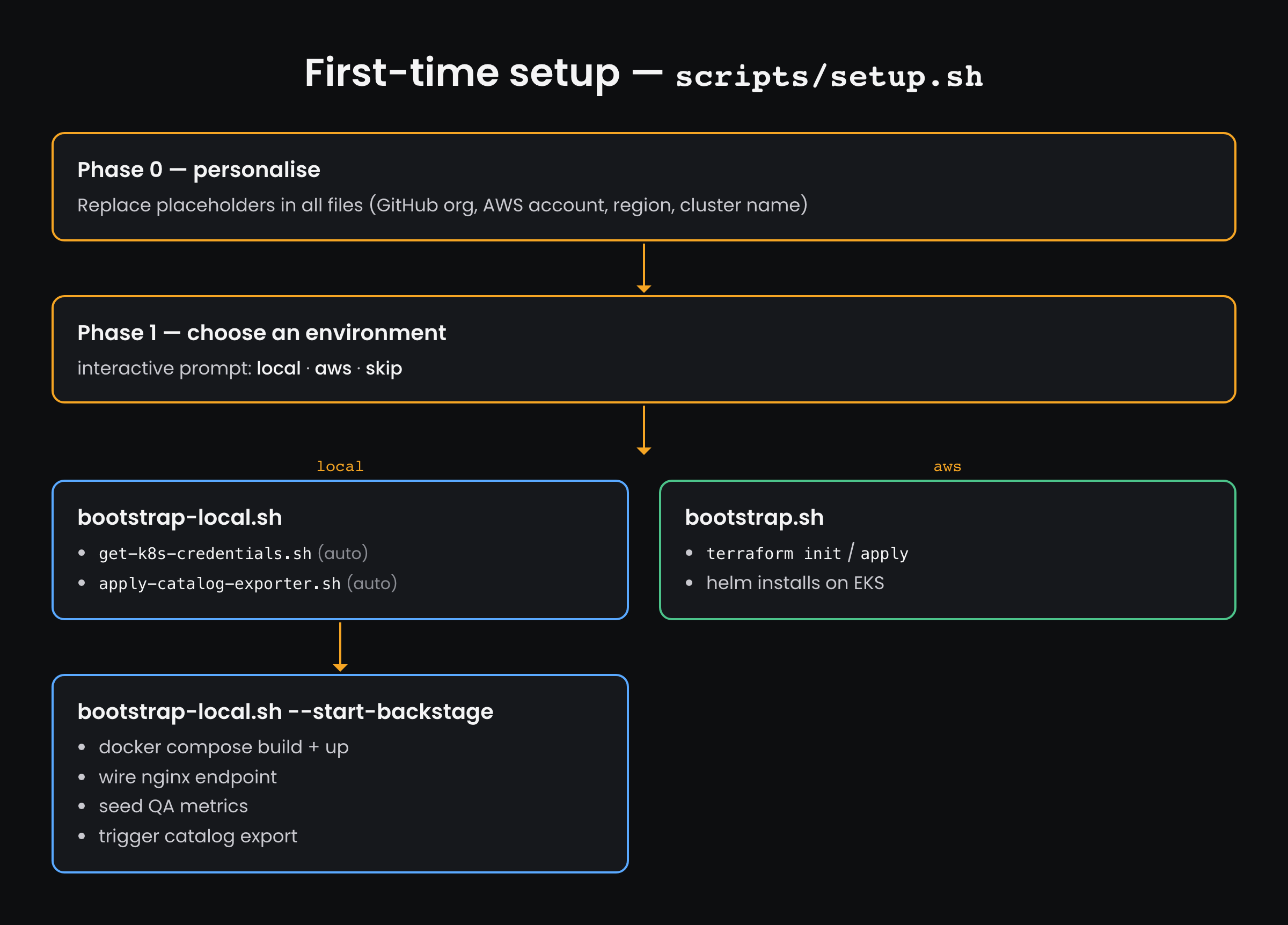
Then, per new service or QA test suite (day-2):
# Per new service (day-2)
idp scaffold service --name my-svc --type nodejs   # Backstage API when running
idp scaffold service --name my-svc --type nodejs --local  # offline / pre-Backstage
scripts/setup-runner.sh --repo my-svc

# Per new QA test suite (day-2)
idp scaffold test-suite --name my-e2e  --type playwright    --service my-svc
idp scaffold test-suite --name my-perf --type k6            --service my-svc --vus 20
idp scaffold test-suite --name my-a11y --type accessibility --service my-svc